Social media scheduler
Social Media Scheduler — Post Once, Publish Everywhere
One dashboard for TikTok, Instagram, YouTube, LinkedIn, X, Facebook, Threads, Pinterest, Reddit, Bluesky and Google Business. Write the post once, then schedule it everywhere — in your timezone, on time, without eleven browser tabs.
7 days free, then from $19.90 a month. Cancel anytime.
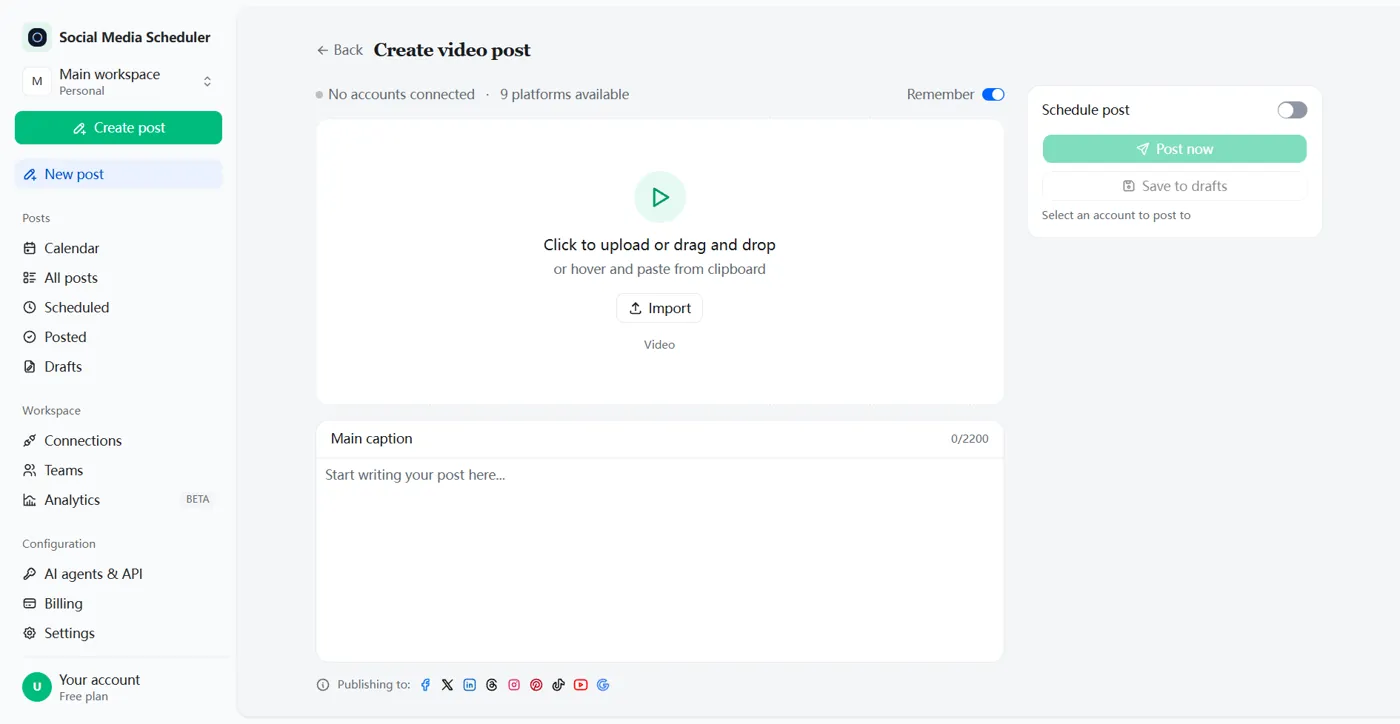
Post once, publish to every platform
A social media scheduler is only worth using if it saves you real time. Write the post once, choose the accounts, and publish to all of them in the same action instead of opening each app in turn.
Eleven networks from one dashboard
TikTok, Instagram, YouTube, LinkedIn, Facebook, X, Threads, Pinterest, Reddit, Bluesky and Google Business. Add personal profiles, brand pages and client accounts, then read every scheduled post in a single list rather than five inboxes.
Per-platform captions and media
One caption rarely fits every network. Adjust the wording, hashtags and media for each destination before it goes live, so a long LinkedIn thought does not publish as an unreadable wall on X and a vertical clip does not arrive cropped on YouTube. You write the base post once; the scheduler carries the differences for you.
Carousels, reels and stories
Publish single images, multi-image carousels, short video and stories. Bulk upload a folder of clips and spread them across the week in one pass instead of scheduling each one by hand.
Connect once
Link your accounts through each platform’s own login. We never see or store your password — only a token you can revoke at any time.
Write once
One post, adapted per platform — caption length, hashtags and media handled for you, so nothing publishes cropped or cut off.
Schedule everywhere
Queue a week in an afternoon. Posts go out on time, in your timezone, even while you sleep.
See what worked
Every scheduled post reports back per platform, so you know which caption and which hour to repeat.
Schedule posts that actually go out on time
Queue a week of content in one afternoon and stop thinking about it. The scheduler stores the exact publish time with your timezone, retries what fails, and tells you which account received the post — so “I think it went out” stops being the answer.
Calendar and queue
Every scheduled post sits on a calendar where you can drag it to a new slot, duplicate it to another account, or delete it before it publishes. Nothing leaves the queue without you seeing it first.
Recurring and bulk scheduling
Repeat a post every other day, alternate between two weekly patterns, or loop an evergreen post until you turn it off. Recurring schedules keep publishing for you, which is what most “post daily” advice actually requires.
Built for the one person running the marketing
Most social media scheduling software is built for agencies: seats, approval chains, client reports, a monthly invoice per colleague. If you are the entire marketing department, that ceremony costs more time than it saves.
Multiple accounts per platform
Accounts come in sets: one set holds one account on every platform. Need a second TikTok or a second brand page? Add another set — Growth includes five and Agency fifteen — and publish one post to as many sets as you like. There is no per-seat charge.
Pricing that does not need a team budget
Plans start at $19.90 a month for one account on every platform. You pay for account sets, not for colleagues you do not have, and unlimited posts are included on every plan.
A social media scheduling API
Post from your own code, a script or an automated agent. Create an API key in settings, send the caption, media and target accounts, and the post travels through the same publishing pipeline as anything scheduled in the dashboard.
curl -X POST https://socialmediascheduler.cc/api/v1/posts \
  -H "Authorization: Bearer $SMS_API_KEY" \
  -H "Content-Type: application/json" \
  -d '{"caption":"Shipping v2 today",
       "platforms":["tiktok","instagram","linkedin"],
       "scheduled_at":"2026-11-02T09:00:00-08:00"}'
The API is included on every plan rather than sold as a separate enterprise tier, and it speaks the same account connections you already authorised in the dashboard.
API, MCP server and webhooks for developersHow it works
- 1
Connect your accounts
Sign in on each platform’s own login page. We never see your password — we keep a revocable token and refresh it for you in the background.
- 2
Write the post once
Add the caption and media, then tick the accounts that should get it. Adjust the caption per platform if the networks need different wording.
- 3
Schedule it, or publish now
Pick a time or send immediately. The scheduler retries failed publishes and reports the result per account, so you are not left guessing.
Social media scheduler vs Buffer and Hootsuite
Both are good products built around teams. If you are one person marketing one business, the comparison is mostly about what you pay per account.
| Social Media Scheduler | Buffer | Hootsuite | |
|---|---|---|---|
| Starting price | $19.90 / month | $5 / month per channel | $99 / month per user |
| Accounts included | 1 on every platform | You pay for each channel | 10 on Standard |
| Charged per seat | No | No | Yes |
| Multiple accounts per platform | Yes, one per account set | Yes | Yes |
| Free option | 7-day trial | Free plan, 3 channels | 14-day trial |
Competitor pricing from buffer.com/pricing and hootsuite.com/plans, checked October 2026. Their plans change; ours is listed below.
Simple pricing for social media scheduling
Pay for account sets — one account on every platform per set — not for seats. Unlimited posts on every plan.
Solo
$19.90/month
1 account set, billed monthly
or $199/year — two months free
- ·One account on each of 10 platforms
- ·Unlimited scheduled posts
- ·Per-platform captions and media
- ·Email support
Growth
Most popular$39/month
5 account sets, billed monthly
or $390/year — two months free
- ·Up to 5 accounts on each platform
- ·Unlimited scheduled posts
- ·Post to several sets at once
- ·Email support
Agency
$99/month
15 account sets, billed monthly
or $990/year — two months free
- ·Up to 15 accounts on each platform
- ·Unlimited scheduled posts
- ·Post to several sets at once
- ·Priority support
$0.00 due today · cancel anytime · prices in USD
Frequently asked questions
What is a social media scheduler?
A social media scheduler is a tool that publishes your posts to several social networks at a time you choose. Instead of opening each app to post by hand, you write the post once, pick the accounts, and the scheduler sends it out — immediately or at a scheduled time.
Which platforms can I post to at once?
TikTok, Instagram, YouTube, LinkedIn, Facebook, X, Threads, Pinterest, Reddit, Bluesky and Google Business. You can publish to a single network or to all of them in the same action.
Can I connect more than one account per platform?
Yes. Accounts come in sets: one set holds one account on every platform, and a second account on the same platform goes in a second set. Solo includes 1 set, Growth 5 and Agency 15 — so Agency can run 15 TikTok accounts side by side, and you can publish one post to several sets at once.
Do scheduled posts get less reach than manual posts?
No. A scheduled post is delivered through the same official publishing API the platform gives to apps, so it reaches the same audience as a post you upload by hand. Scheduling changes when you do the work, not how the post is distributed.
How much does it cost and is there a free trial?
Solo is $19.90 a month for 1 account set, Growth $39 for 5 sets and Agency $99 for 15 sets; yearly billing gets two months free. Every plan starts with a 7-day free trial. You add a card at checkout, nothing is charged until the trial ends, and you can cancel before then.
Can I schedule recurring posts?
Yes. You can repeat a post every other day, alternate between two weekly patterns, or loop an evergreen post on a schedule that keeps publishing until you turn it off.
Is there an API I can post from programmatically?
Yes. Create an API key in settings and publish through the same pipeline the dashboard uses. The API is included on every plan rather than sold as a separate enterprise tier.
Do I have to give you my social media passwords?
No. You sign in on each platform’s own login screen and authorise access there. We store a revocable token, never your password, and you can disconnect any account from your settings page at any time.
Ready when you are
Connect your first account in about a minute. Social Media Scheduler keeps the rest of the schedule.
Start 7-day free trial